Verify Email Page in HTML & CSS with Animation
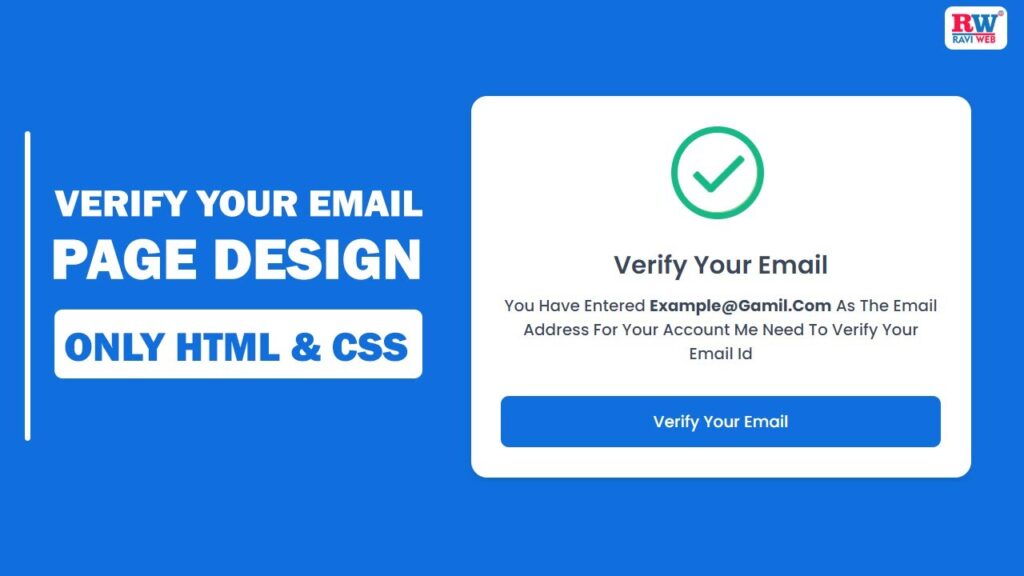
Every modern website or web application requires a Verify Email Page. Whether you are creating a signup system, login security, account activation, or user onboarding flow—email verification is always a crucial step.
A professional Email Verification UI Design not only improves the user experience but also builds trust. That is why today we will create a clean, modern, and fully responsive Verify Email Page using HTML & CSS.
In this tutorial, we will also implement an Animated Check Icon using pure CSS. The animation gives a beautiful visual confirmation that feels smooth and professional.
Also Read:
You will also get:
- Complete source code
- Step-by-step explanation
- Clean UI
- Lightweight HTML + CSS
- No JavaScript required
Verify Your Email Page Design in HTML & CSS – Full Source Code & Animation
What Is a Verify Email Page?
A Verify Email Page is a confirmation screen where the user is informed that:
You have entered this email. Please verify it to continue.
This page usually includes:
- A success or check animation
- A short verification message
- User email address
- A ‘Verify Email’ button
A clean and responsive email verification page design improves UX and looks professional inside any project.
Also Read:
Features of This Email Verification Template
This verify email template includes:
- Modern and clean UI
- Pure CSS animated check icon
- Fully responsive email verification page design
- Easy-to-understand HTML structure
- Lightweight CSS
- Attractive button hover animation
- Works on all modern browsers
This design is ideal for:
- Signup verification
- Account activation
- Email confirmation pages
- OTP process confirmation
Project File Structure
You only need two files for this design:
index.html– defines the structure of the verify email pagestyle.css– handles the styling and the check icon animation
Make sure both files are in the same folder so the CSS link works correctly.
HTML Code:
<!DOCTYPE html>
<html lang="en">

<head>
    <meta charset="UTF-8">
    <meta http-equiv="X-UA-Compatible" content="IE=edge">
    <meta name="viewport" content="width=device-width, initial-scale=1.0">
    <title>Verify Your Email page desing in html and css || Ravi Web</title>
    <link rel="stylesheet" href="style.css">
</head>

<body>
    <div class="wrapper">
        <div class="container">
            <div class="success-section">
                <div class="check-icon">
                    <span class="icon-line line-tip"></span>
                    <span class="icon-line line-long"></span>
                    <div class="icon-circle"></div>
                    <div class="icon-fix"></div>
                </div>
            </div>
            <div class="title-section">
                <h2 class="title">Verify Your Email</h2>
                <p class="para">You Have Entered <strong>Example@Gmail.Com</strong> As The Email Address For Your Account.
                     We Need To Verify Your Email Id</p>
            </div>
            <button class="submit-btn" type="submit">Verify your email</button>
        </div>
    </div>
</body>

</html>
HTML Structure Explanation
<div class="wrapper">: This full‑screen wrapper centers the verification card both vertically and horizontally and provides the blue background you see behind the card.<div class="container">:
This is the white card that holds the check icon, title, description, and button. It looks like a dialog box or a small email verification template..success-sectionand.check-icon:
These containers are used to build the circular animated check mark using spans and divs. All lines and shapes are drawn with CSS..title-section
This section holds the heading and paragraph text which explains that the user’s email must be verified.<button class="submit-btn">Verify your email</button>
This is your call‑to‑action button. In a real project, you can convert this into a link or hook it to your backend verification route.
This simple structure is enough for a clean verify email template HTML that can integrate smoothly into bigger authentication systems.
Also Read:
- OTP Verification Code Form Using HTML, CSS and JavaScript
- Responsive Portfolio Website HTML CSS JavaScript
CSS Code:
@import url('https://fonts.googleapis.com/css2?family=Poppins:wght@400;500;600;700;800;900&display=swap');

* {
    margin: 0;
    padding: 0;
    box-sizing: border-box;
    font-family: 'Poppins', sans-serif;
}

.wrapper {
    background-color: #106fde;
    width: 100%;
    height: 100vh;
    padding: 15px;
    display: flex;
    justify-content: center;
    align-items: center;
}

.container {
    width: 500px;
    background-color: #fff;
    padding: 30px 30px;
    border-radius: 16px;
    box-shadow: rgba(0, 0, 0, 0.08) 0px 4px 12px;
}

.success-section {
    width: 100px;
    height: 100px;
    margin: 0 auto;
    padding: 0;
    margin-bottom: 20px;
    overflow: hidden;
}

.success-section .check-icon {
    width: 80px;
    height: 80px;
    position: relative;
    border-radius: 50%;
    box-sizing: content-box;
    border: 7px solid #14BA85;
    overflow: hidden;
}

.success-section .check-icon::before {
    content: '';
    height: 101px;
    position: absolute;
    background: #ffff;
    transform: rotate(-45deg);
}

.success-section .check-icon::after {
    content: '';
    height: 101px;
    position: absolute;
    background: #ffff;
    transform: rotate(-45deg);
}

.success-section .check-icon .icon-line.line-tip {
    top: 46px;
    left: 14px;
    width: 25px;
    transform: rotate(45deg);
    animation: icon-line-tip 2s;
}

@keyframes icon-line-tip {
    0% {
        width: 0;
        left: 1px;
        top: 19px;
    }

    54% {
        width: 0;
        left: 1px;
        top: 19px;
    }

    70% {
        width: 50px;
        left: -8px;
        top: 37px;
    }

    84% {
        width: 17px;
        left: 21px;
        top: 48px;
    }

    100% {
        width: 25px;
        left: 14px;
        top: 45px;
    }
}

.success-section .check-icon .icon-line {
    height: 7px;
    background-color: #14BA85;
    display: block;
    border-radius: 2px;
    position: absolute;
    z-index: 10;
}

.success-section .check-icon .icon-line.line-long {
    top: 38px;
    right: 8px;
    width: 47px;
    transform: rotate(-45deg);
    animation: icon-line-long 2s;
}

@keyframes icon-line-long {
    0% {
        width: 0;
        right: 46px;
        top: 54px;
    }

    65% {
        width: 0;
        right: 46px;
        top: 54px;
    }

    84% {
        width: 55px;
        right: 0px;
        top: 35px;
    }

    100% {
        width: 47px;
        right: 8px;
        top: 38px;
    }
}

.success-section .check-icon .icon-circle {
    top: -7px;
    left: -7px;
    z-index: 10;
    width: 80px;
    height: 80px;
    border-radius: 50%;
    position: absolute;
    box-sizing: content-box;
    border: 7px solid rgba(76, 175, 80, 0.7);
}

.success-section .check-icon .icon-fix {
    top: 8px;
    width: 7px;
    left: 26px;
    z-index: 1;
    height: 85px;
    position: absolute;
    transform: rotate(-45deg);
    background: #ffff;
}

.title-section {
    margin-bottom: 30px;
    text-align: center;
}

.title {
    color: #38475a;
    font-size: 25px;
    font-weight: 600;
    margin-bottom: 10px;
    text-transform: capitalize;
}

.para {
    color: #38475a;
    font-size: 16px;
    font-weight: 500;
    line-height: 1.5;
    margin-bottom: 20px;
    text-transform: capitalize;
}

.submit-btn {
    width: 100%;
    background: #106fde;
    border: 1px solid transparent;
    border-radius: 8px;
    font-size: 16px;
    color: #fff;
    padding: 13px 24px;
    font-weight: 500;
    text-align: center;
    text-transform: capitalize;
    cursor: pointer;
    transition: all 0.4s;
}

.submit-btn:hover {
    background: none;
    border: 1px solid #106fde;
    color: #106fde;
}
CSS Explanation and Animation Logic
Global Styles and Layout
- The
@importline loads the Poppins font from Google Fonts, giving the UI a modern and consistent look. - The universal selector
*resets margin and padding and setsbox-sizing: border-box, which simplifies layout calculations for every element. .wrapperusesheight: 100vhplusdisplay: flex,justify-content: center, andalign-items: centerto center the verification card perfectly, making the whole page look like a focused email verification UI design.
This pattern is commonly used in modern HTML CSS UI design tutorials to create single‑card pages like login, signup, and verification screens.
Card Design
.containerdefines the width, white background, padding, border radius, and subtle shadow. It behaves like a neat card placed on a blue background, similar to a small HTML CSS email confirmation page card or modal.- The width is fixed at 500px for desktops, but because the wrapper uses padding and flexbox, it still behaves nicely on smaller devices.
If you want more responsive behavior later, you can add a media query to reduce the container width on very small screens.
Conclusion
In this tutorial, we created a fully responsive and modern Verify Email Page using HTML and CSS. With the help of animations, a clean layout, and a simple structure, this design can be used in any web project that requires email confirmation.
Whether you’re building a signup system, login system, user dashboard, or SaaS application—this Verify Email Template will fit perfectly.