Social Media Share Buttons UI in HTML CSS JavaScript
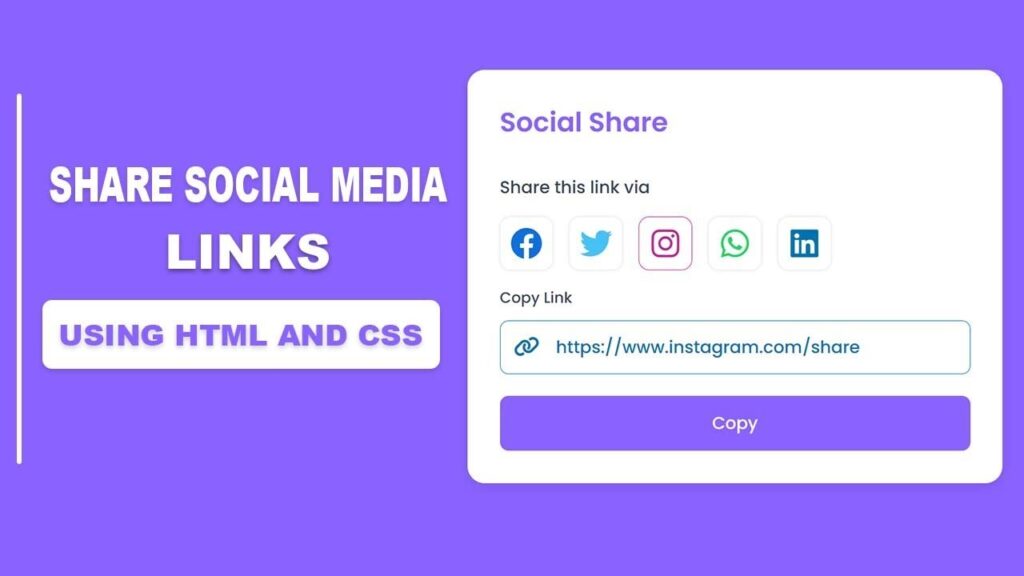
In this guide, social sharing is no longer optional for websites, blogs, SaaS products, or portfolio projects. A well‑designed social media share buttons UI helps users instantly share your content on platforms like Facebook, Twitter (X), Instagram, WhatsApp, and LinkedIn.
In this tutorial, you will learn how to build a modern, responsive Social Share UI using HTML, CSS, and JavaScript with an advanced copy link feature. This project is beginner‑friendly, and perfect for real‑world websites.
Whether you are a frontend developer, student, or freelancer, this component can significantly improve user engagement and website reach.
Also Read
- Modern Responsive Portfolio Website Using HTML & CSS
- Password Strength Validation in JavaScript
- How To Create Responsive Table In HTML & CSS
- File Upload Form Using HTML, CSS, and JavaScript
- Responsive Navigation Menu Bar in HTML CSS | Dark Mode & Search Box
Watch the Video Tutorial: Social Media Share Buttons UI
Features of This Social Share UI
This project includes the following features:
- Modern card‑style layout
- Responsive design (mobile, tablet & desktop)
- Social icons for:
- Twitter (X)
- Active state effect on selected platform
- Copy link input field
- One‑click copy to clipboard functionality
- Clean and minimal UI design
- Lightweight and fast loading
- Easy to customize
Technologies Used
- HTML5 – structure
- CSS3 – layout, colors, responsiveness
- JavaScript (Vanilla) – logic for copying and dynamic interaction
- Font Awesome Icons – social icons
- Google Fonts (Poppins) – modern typography
Project Folder Structure
project-folder/
│
├── index.html
├── style.css
├── script.js
UI Design Overview
- Title section
- Social icon buttons
- Copy link input field
- Copy button
How the Social Share Buttons Work
When someone taps on any social media icon, the system responds instantly to guide the user in a simple and smooth way.
First, the selected social button is visually highlighted so the user knows which platform is active.
Next, the correct sharing link for that platform is automatically placed inside the input box.
After that, the input field is focused and highlighted, making it easy for the user to notice and interact with the link.
Finally, the user can press the Copy button to save the link directly to the clipboard and share it anywhere they like.
This small but thoughtful interaction improves usability and gives the login page a clean, professional feel.
JavaScript Logic Explained
Your JavaScript performs three main tasks:
- Detect which social icon is clicked
- Highlight the active button
- Copy the generated link to clipboard
HTML Code:
<!DOCTYPE html>
<html lang="en">

<head>
    <meta charset="UTF-8">
    <meta http-equiv="X-UA-Compatible" content="IE=edge">
    <meta name="viewport" content="width=device-width, initial-scale=1.0">
    <title>Social Share page desing in html css & javascript || Ravi Web</title>
    <!-- ----font awesome 6.4.0 cdn -->
    <link rel="stylesheet" href="https://cdnjs.cloudflare.com/ajax/libs/font-awesome/6.4.0/css/all.min.css">
    <!-- css link -->
    <link rel="stylesheet" href="style.css">
</head>

<body>
    <div class="wrapper">
        <div class="container">
            <div class="title-section">
                <h2 class="title">Social Share</h2>
            </div>
            <div class="icon-container">
                <h3 class="icon-title">Share this link via</h3>
                <div class="social-box">
                    <a href="#" class="social-link facebook" data-link="https://www.facebook.com/share"><i class="fa-brands fa-facebook"></i></a>
                    <a href="#" class="social-link twitter" data-link="https://www.twitter.com/share"><i class="fa-brands fa-twitter"></i></a>
                    <a href="#" class="social-link instagram" data-link="https://www.instagram.com/share"><i class="fa-brands fa-instagram"></i></a>
                    <a href="#" class="social-link whatsapp" data-link="https://www.whatsapp.com/share"><i class="fa-brands fa-whatsapp"></i></a>
                    <a href="#" class="social-link linkedin" data-link="https://www.linkedin.com/share"><i class="fa-brands fa-linkedin"></i></a>
                </div>
            </div>
            <form action="" class="form">
                <div class="input-group ">
                    <label class="label-title">Copy Link</label>
                    <input type="text" id="input-field" value="example.com/share-link">
                    <i class="icon fa-solid fa-link"></i>
                </div>

                <button id="copy-btn" class="submit-btn">Copy</button>

            </form>
        </div>
    </div>
    <script src="script.js"></script>
</body>

</html>
CSS Code:
@import url('https://fonts.googleapis.com/css2?family=Poppins:wght@400;500;600;700;800;900&display=swap');
*{
    margin: 0;
    padding: 0;
    box-sizing: border-box;
    font-family: 'Poppins', sans-serif;
}
.wrapper{
    background-color: #8a62ff;
    width: 100%;
    height: 100vh;
    padding: 15px;
    display: flex;
    justify-content: center;
    align-items: center;
}
.container{
    width: 500px;
    background-color: #fff;
    padding: 30px 30px;
    border-radius: 16px;
    box-shadow: rgba(0, 0, 0, 0.08) 0px 4px 12px;
}
.title-section{
    margin-bottom: 30px;
}
.title{
    color: #8a62ff;
    font-size: 25px;
    font-weight: 600;
    margin-bottom: 10px;
    text-transform: capitalize;
}

.icon-container{
    margin-bottom: 10px;
}
.icon-container .icon-title{
    font-size: 16px;
    font-weight: 500;
    color: #38475a;
}

.social-box{
    margin: 15px 0;
    display:flex ;
    gap: 15px;
}
.social-box .social-link{
    display: flex;
    flex-direction: row;
    justify-content: center;
    align-items: center;
    font-size: 30px;
    height: 50px;
    width: 50px;
    border: 1px solid #EAECF0;
    text-decoration: none;
    border-radius: 20%;
    transition: all 0.5s;
    box-shadow: rgba(0, 0, 0, 0.1) 0px 0px 3px 0px;

}

/* ====facebook==== */
.social-box .social-link.facebook{
    color: #106fde;
}
.social-box .social-link.facebook.active,
.social-box .social-link.facebook:hover{
    border: 1px solid #106fde;
}

/* ====twitter==== */
.social-box .social-link.twitter{
    color: #46c1f6;
}
.social-box .social-link.twitter.active,
.social-box .social-link.twitter:hover{
    border: 1px solid #46c1f6;
}
/* ====instagram==== */
.social-box .social-link.instagram{
    color: #bc2a8d;
}
.social-box .social-link.instagram.active,
.social-box .social-link.instagram:hover{
    border: 1px solid #bc2a8d;
}

/* ====whatsapp==== */
.social-box .social-link.whatsapp{
    color: #25d366;
}
.social-box .social-link.whatsapp.active,
.social-box .social-link.whatsapp:hover{
    border: 1px solid #25d366;
}

/* ====whatsapp==== */
.social-box .social-link.linkedin{
    color: #0072b1;
}
.social-box .social-link.linkedin.active,
.social-box .social-link.linkedin:hover{
    border: 1px solid #0072b1;
}


.input-group{
    position: relative;
}
.input-group .label-title{
    color: #38475a;
    text-transform: capitalize;
    margin-bottom: 11px;
    font-size: 14px;
    font-weight: 500;
    display: block;
}
.input-group input{
    background: none;
    color: #38475a;
    height: 50px;
    width: 100%;
    font-size: 16px;
    font-weight: 500;
    padding: 9px 18px 9px 52px;
    border: 1px solid #EAECF0;
    outline: none;
    border-radius: 8px;
    margin-bottom: 20px;

}
.input-group.active input{
    color: #0072b1;
    border: 1px solid #0072b1;
}
.input-group .icon{
    color: #38475a;
    position: absolute;
    left: 13px;
    top: calc(50% - 4px);
    text-align: center;
    font-size: 19px;
}
.input-group.active .icon{
    color: #0072b1;
}


.submit-btn{
    width: 100%;
    background: #8a62ff;
    border: 1px solid transparent;
    border-radius: 8px;
    font-size: 16px;
    color: #fff;
    padding: 13px 24px;
    font-weight: 500;
    text-align: center;
    text-transform: capitalize;
    cursor: pointer;
    transition: all 0.4s;
}
.submit-btn:hover{
    background: none;
    border: 1px solid #8a62ff;
    color:#8a62ff;
}
JavaScript Code:
// getting all attributes
const socialLink=document.querySelectorAll(".social-link");
const inputGroup=document.querySelector(".input-group");
let inputField=document.getElementById("input-field");
const copyBtn=document.getElementById("copy-btn");

for(let i=0; i<socialLink.length; i++){
    socialLink[i].addEventListener("click", ()=>{

        for(let j=0; j<socialLink.length; j++){  //active class added and removed of social button
            if(socialLink[i]===socialLink[j]){
                socialLink[j].classList.add("active");
            }else{
                socialLink[j].classList.remove("active");
            }
        }

        let socialLinkValue=socialLink[i].dataset.link;   //getting social link value from data-link attribute
        inputField.setAttribute('value', socialLinkValue);  //setting social link value from data-link attribute to input field value
        inputGroup.classList.add("active")
    });

}

copyBtn.addEventListener("click",()=>{
     inputField.select();
      // Copy the text inside the text field
    navigator.clipboard.writeText(inputField.value);

})
Conclusion
The Social Media Share Buttons UI in HTML, CSS, and JavaScript is a must‑have component for modern websites. It improves usability, increases reach, and enhances the professional appearance of your site.
With its responsive design, copy link feature, and clean code structure, this project is perfect for learning and real deployment.
If you are building frontend projects or a portfolio, adding this component will significantly boost your credibility.