Responsive Login Page Design in HTML & CSS – Modern UI Tutorial
In today’s digital world, almost every website and application requires a secure and visually attractive login page. Whether it is a portfolio website, an admin dashboard, an e-commerce platform, or a SaaS product, the login screen is usually the first interaction point for users.
A well-designed login page not only improves security but also builds trust and creates a professional impression. That is why frontend developers focus a lot on creating clean, responsive, and modern login interfaces.
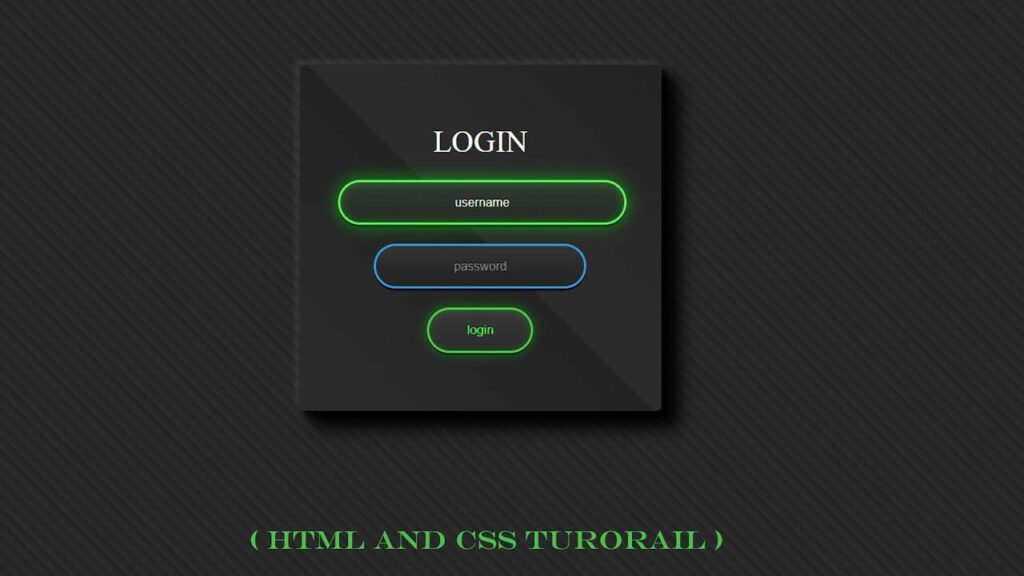
In this tutorial, you will learn how to create a beautiful and glowing responsive login page using HTML and CSS. This design uses modern gradients, shadow effects, smooth animations, and focus interactions to give users a premium experience.
This project is perfect for:
- Beginners learning frontend development
- Students practicing HTML and CSS
- Developers building UI components
- Developers building UI components
- Portfolio projects
Also Read
- Login Form In HTML and CSS | Toggle Password Visibility
- Social Media Share Buttons UI in HTML CSS JavaScript
- Responsive Registration Form in HTML and CSS
- Password Strength Validation in JavaScript
Watch the Video : Responsive Login Page Design in HTML & CSS
Why Login Page Design Matters
Many beginners underestimate the importance of login UI design. But in real-world projects, login screens play a huge role.
Here are some reasons why login page design is important:
- First impression of your website
- Improves user trust
- Makes your project look professional
- Makes your project look professional
- Increases engagement
A boring or broken login page can make users leave instantly. On the other hand, a clean and modern design keeps users confident and comfortable.
Features of This Login Page Design
This login page is designed with simplicity, performance, and modern UI standards in mind. Instead of using heavy libraries or complex frameworks, it focuses on clean HTML and CSS to deliver a smooth and professional user experience.
The layout automatically adjusts to different screen sizes, so it works perfectly on desktops, tablets, and mobile devices without breaking the design. The dark-themed background gives the interface a premium look while also reducing eye strain during long usage.
Subtle gradient layers are applied to create depth and visual balance, making the form more attractive without being distracting. When users click on the input fields, a soft glowing animation appears, clearly indicating focus and improving usability.
Buttons and input fields include smooth hover and transition effects, which make interactions feel responsive and polished. The typography is simple and readable, ensuring that users can easily understand what information is required.
The login card is placed at the center of the screen to maintain visual focus and accessibility. The code structure is kept clean and well-organized, making it easy for beginners to understand, modify, and reuse in their own projects.
Technologies Used
This login page project is created using simple and reliable frontend technologies that are easy to learn and widely supported by modern browsers.
The main goal is to keep the design lightweight, fast, and beginner-friendly while still maintaining a professional look.
Here is what has been used in this project:
- HTML5 to build the basic structure of the login form and input fields.
- CSS3 to design the layout, colors, animations, shadows, and smooth hover effects.
No JavaScript or external frameworks are required for this design. This helps the page load faster and makes the code easier to understand, edit, and reuse in other projects.
Because of this simple setup, even beginners can study the code, customize the layout, and use it in their own websites or portfolios without any difficulty.
Project Preview Description
The design consists of a centered login box with:
- Username input field
- Username input field
- Login button
- Neon glowing effect on focus
- Gradient dark background
When users click on input fields, they see a glowing green animation which improves visual feedback.
Folder Structure
project-folder/
│
├── index.html
└── style.css
HTML Code:
Your HTML structure is simple and clean:
<!DOCTYPE html>
<html lang="en">

<head>
    <meta charset="UTF-8">
    <meta name="viewport" content="width=device-width, initial-scale=1.0">
    <title>Responsive Login Page Design in HTML & CSS – Modern UI Tutorial</title>
    <link href="style.css" rel="stylesheet">
</head>

<body>
    <form class="box">
        <h1>login</h1>
        <input type="text" placeholder="username" class="usid">
        <input type="password" placeholder="password" class="usid">
        <input type="submit" value="login" class="button">
    </form>
</body>

</html>
Explanation:
<form>wraps the login box<form>wraps the login box<h1>shows the login title- Submit button for login
CSS Code :
body {
    margin: 0;
    padding: 0;
    font-family: sans-serif;
    background-color: #222222;
    background: repeating-linear-gradient(45deg, #2b2b2b 0%, #2b2b2b 10%, #222222 50%)0/ 15px 15px;
}

.box {
    width: 300px;
    padding: 40px;
    background: #222222;
    background: repeating-linear-gradient(45deg, #2b2b2b 0%, #2b2b2b 10%, #222222 50%);
    border: 1px solid rgb(44, 44, 43);
    border-radius: 5px;
    box-shadow: -5px -5px 5px #ffffff0d,
        5px 5px 5px #000000a6,
        10px 10px 10px #000000a6,
        15px 15px 15px #000000a6,
        20px 20px 20px #000000a6;
    margin: auto;
    margin-top: 100px;
    text-align: center;
    position: relative;
}

.box h1 {
    color: #fff;
    font-weight: 400;
    text-transform: uppercase;
}

.usid {
    border: 2px solid #3498db;
    background: #222;
    background: linear-gradient(#333, #222);
    display: block;
    margin: 20px auto;
    text-align: center;
    box-shadow: 0 2px 0 #000;
    color: #888;
    padding: 14px 10px;
    width: 200px;
    outline: none;
    font-family: 'cabin' Arial, Helvetica, sans-serif;
    font-size: 13px;
    font-weight: 400;
    text-shadow: 0 -1px 0 #000;
    border-radius: 24px;
    transition: 0.25;

}

.usid::-webkit-input-placeholder {
    color: #888;
}

.usid:-moz-placeholder {
    color: #888;
}

.usid:focus {
    width: 280px;
    animation: glow 800ms ease-out infinite alternate;
    background: #222922;
    background: linear-gradient(#333933, #222922);
    border-color: #393;
    box-shadow: 0 0 5px #00ff0033, inset 0 0 5px #00ff001a, 0 2px 0 #000;
    color: #efe;
    outline: none;
}

.usid:focus::-webkit-input-placeholder {
    color: #efe;
}

.usid:focus:-moz-placeholder {
    color: #efe;
}

.button {
    background: #222;
    background: linear-gradient(#333, #222);
    box-sizing: border-box;
    border: 2px solid #2ecc71;
    box-shadow: 0 2px 0 #000;
    color: #efe;
    display: block;
    font-family: 'cabin' Arial, Helvetica, sans-serif;
    margin: 20px auto;
    text-align: center;
    padding: 14px 40px;
    outline: none;
    border-radius: 24px;
    transition: 0.25;
    cursor: pointer;
}

.button:hover,
.button:focus {
    animation: glow 800ms ease-out infinite alternate;
    background: #292929;
    background: linear-gradient(#393939, #292929);
    color: #5f5;
    outline: none;
}

@keyframes glow {
    0% {
        border-color: #393;
        box-shadow: 0 0 5px #00ff0033, inset 0 0 5px #00ff001a, 0 2px 0 #000;
    }

    100% {
        border-color: #6f6;
        box-shadow: 0 0 20px #00ff0099, inset 0 0 10px #00ff0066, 0 2px 0 #000;
    }
}
CSS Styling Breakdown
Your CSS creates the magic behind the UI.
Background Styling
The body uses a repeating linear gradient:
background: repeating-linear-gradient(45deg, #2b2b2b 0%, #2b2b2b 10%, #222222 50%) 0/15px 15px;
This creates a textured dark theme background.
Login Box Design
The .box class creates the card layout:
- Fixed width
- Fixed width
- Rounded corners
- Multi-layer shadows
- Gradient background
Input Field Design
The .usid class styles input fields:
- Rounded pill shape
- Centered text
- Gradient background
- Soft border
- Smooth transitions
When focused, the input expands and glows:
.usid:focus {
  width: 280px;
  animation: glow 800ms ease-out infinite alternate;
}
Button Styling
The .button class adds:
- Green border
- Hover animation
- Glowing effect
- Rounded corners
Animation Effect Explanation
The glow animation:
@keyframes glow {
  0% {
    border-color: #393;
    box-shadow: 0 0 5px #00ff0033;
  }
  100% {
    border-color: #6f6;
    box-shadow: 0 0 20px #00ff0099;
  }
}
This creates a smooth neon effect that makes the UI modern.
Conclusion
Creating a modern login page using HTML and CSS is one of the best frontend projects for beginners and professionals alike. This glowing login UI design not only improves user experience but also makes your website look premium and professional.
You learned:
- How to structure a login page
- How to apply modern CSS styling
- How to create glowing animations
- How to design responsive UI
You can further extend this project by adding backend authentication, API integration, or form validation.